How Project Permissions on Indee Work
In these times of hyper connectivity, teams are often distributed and we realize there may not be a single stakeholder for every title. This is why we’ve created the role of ‘project managers’ so that your teammates can share the responsibility of promoting your titles. Let’s look at how user roles can help your team structure a more efficient workflow to help your promotional activity.
There are two distinct user roles on Indee:
Project Owner
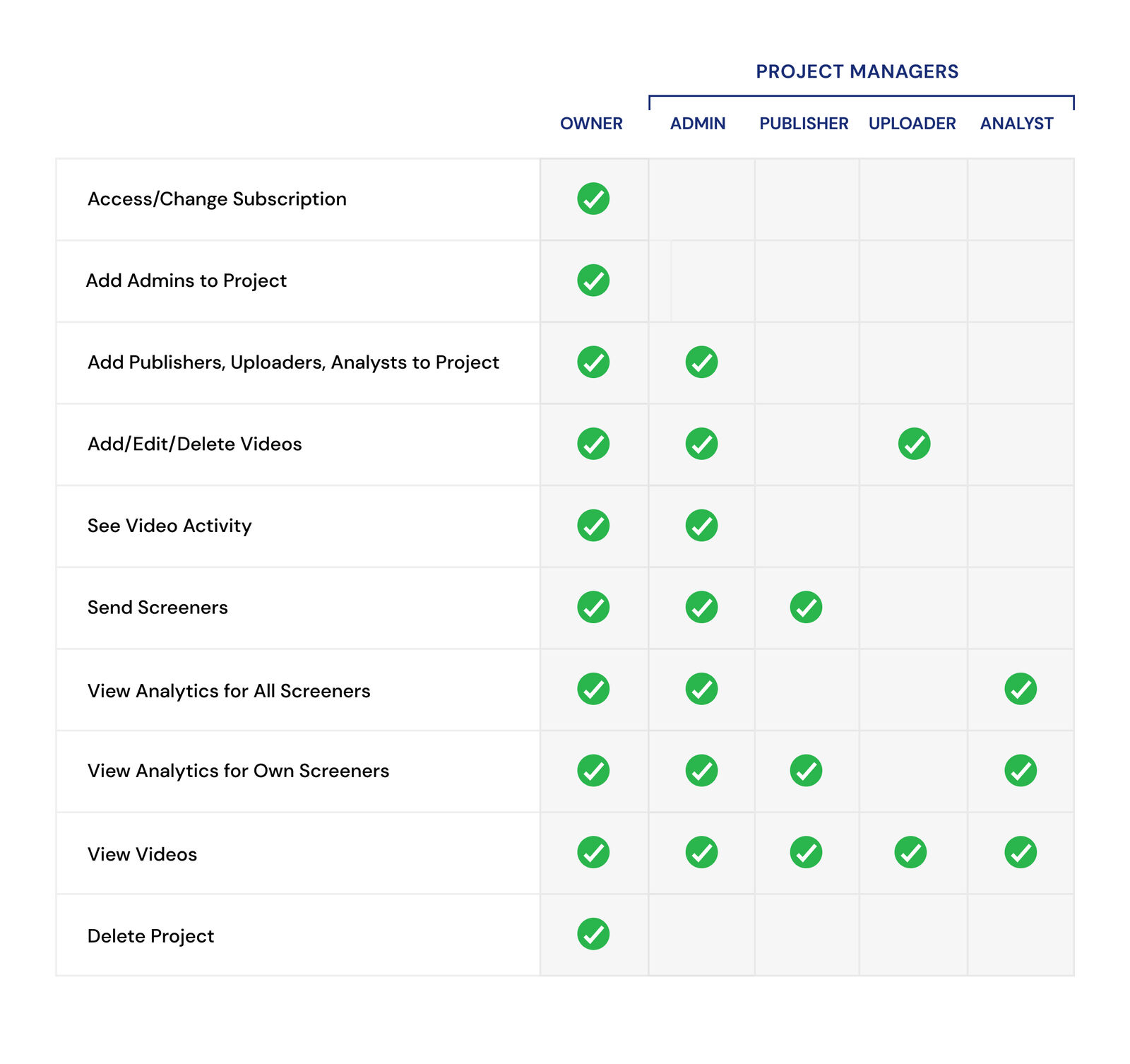
The owner is the creator of a project. It is the project owner’s account that is charged for the project’s subscription. Only project owners have access to any payments, or subscription level operations. This ensures data security and allows for streamlined accounting.
Project Manager
The manager is usually a team member invited by the owner to collaborate on the project and have access to the operational aspects like sending and managing screeners. Project managers are divided into Admins, Publishers, Uploaders and Analysts.
Managers can be split into 4 categories based on their roles: